











TG1
Staff member
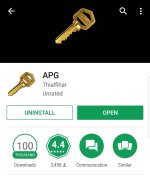
So if you have an android phone and are still concerned about security of messengers (even regular messages) you can download and app from the app store called APG.

Screenshot_20170827-1309541080×1262 220 KB
APG makes it simple to take your keys or create keys on the go to encrypt messages.
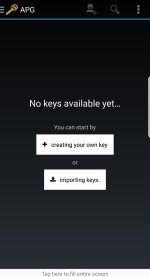
After installed you need to create your keys if not importing them.

Screenshot_20170827-1302161080×1990 376 KB
Create your own key and you’ll see this.

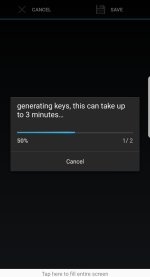
Screenshot_20170827-1302311080×1990 211 KB
Next set the info on the key.

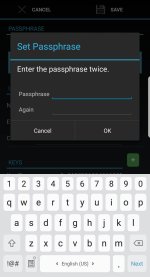
Screenshot_20170827-1303351080×1990 528 KB
Make sure to set your passphrase.

Screenshot_20170827-1303021080×1990 310 KB

Screenshot_20170827-1303461080×1990 359 KB
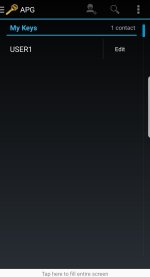
You can export your public keys to someone you are communicating with.
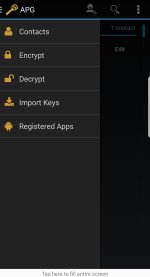
Next you can get ready to send a message to them. You can click on the left side pane and encrypt.

Screenshot_20170827-1303581080×1990 191 KB
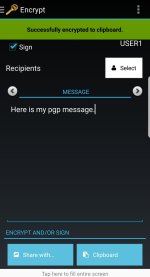
Start your pgp message and sign it with your user.

Screenshot_20170827-1305291080×1990 454 KB
You would select your recipient here and their public keys. This verifies only the user with those keys can decrypt the message.
You can choose share on the bottom left and send the message via wickr or wire or even Facebook messenger (use the encryption on the messenger if using Facebook and make sure your delete time is set).
The output would look similar to this.

Screenshot_20170827-1307331080×1990 624 KB
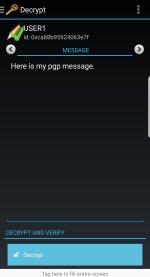
The user would then copy the complete message and open it in APG under decrypt. When it’s setup properly you will decrypt it on the fly as long as signed in with passphrase and message is signed.

Screenshot_20170827-1323591080×1990 427 KB
APG can also be used with K9mail for email such as countermail on mail.
Make sure your encryption algorithm is set above 32bits to something like shown.

Screenshot_20170827-1336441080×1990 479 KB
Always keep in mind that any message to the wrong person can be read if they don’t practice good privacy ethics. The use of rooted phones, encrypted phones and removal of the GPS (go take your phone in to a repair shop and have them physically destroy the gps-best way) and wiping and changing data is important. Always use vpns and tor when needed.

Screenshot_20170827-1309541080×1262 220 KB
APG makes it simple to take your keys or create keys on the go to encrypt messages.
After installed you need to create your keys if not importing them.

Screenshot_20170827-1302161080×1990 376 KB
Create your own key and you’ll see this.

Screenshot_20170827-1302311080×1990 211 KB
Next set the info on the key.

Screenshot_20170827-1303351080×1990 528 KB
Make sure to set your passphrase.

Screenshot_20170827-1303021080×1990 310 KB

Screenshot_20170827-1303461080×1990 359 KB
You can export your public keys to someone you are communicating with.
Next you can get ready to send a message to them. You can click on the left side pane and encrypt.

Screenshot_20170827-1303581080×1990 191 KB
Start your pgp message and sign it with your user.

Screenshot_20170827-1305291080×1990 454 KB
You would select your recipient here and their public keys. This verifies only the user with those keys can decrypt the message.
You can choose share on the bottom left and send the message via wickr or wire or even Facebook messenger (use the encryption on the messenger if using Facebook and make sure your delete time is set).
The output would look similar to this.

Screenshot_20170827-1307331080×1990 624 KB
The user would then copy the complete message and open it in APG under decrypt. When it’s setup properly you will decrypt it on the fly as long as signed in with passphrase and message is signed.

Screenshot_20170827-1323591080×1990 427 KB
APG can also be used with K9mail for email such as countermail on mail.
Make sure your encryption algorithm is set above 32bits to something like shown.

Screenshot_20170827-1336441080×1990 479 KB
Always keep in mind that any message to the wrong person can be read if they don’t practice good privacy ethics. The use of rooted phones, encrypted phones and removal of the GPS (go take your phone in to a repair shop and have them physically destroy the gps-best way) and wiping and changing data is important. Always use vpns and tor when needed.
Attachments
-
 Screenshot_20170827-130954.jpg92.8 KB · Views: 93
 -
 Screenshot_20170827-130216.jpg69.5 KB · Views: 81
 -
 Screenshot_20170827-130231.jpg90.6 KB · Views: 77
 -
 Screenshot_20170827-130335.jpg74.8 KB · Views: 80
 -
 Screenshot_20170827-130302.jpg95.3 KB · Views: 80
 -
 Screenshot_20170827-130346.jpg81.2 KB · Views: 82
 -
 Screenshot_20170827-130358.jpg90.3 KB · Views: 81
 -
 Screenshot_20170827-130529.jpg94.3 KB · Views: 82
 -
 Screenshot_20170827-130733.jpg87.2 KB · Views: 80
 -
 Screenshot_20170827-132359.jpg92.2 KB · Views: 78


